
Greasemonkeyでサイト既存CSSの影響を受けないポップアップパネルを作る方法
Greasemonkeyは各サイトでユーザースクリプトを実行できて便利ですが、ある要素を挿入したときにそれがサイトに元々書いてあるCSSの影響を受けてしまうことがあります。
一つのサイトならまだしもhttp*で動くようなものだと対応仕切れないのでiframeを使いサイトに書いてあるCSSの影響を受けないパネルを作る。
iframeの中はそのサイトにあるCSSの影響を受けないので、iframe内にGreasemonkeyで表示したいものを置けば影響を受けないものが作成できる。
makeFrameというのが今回の主題。
makeFrame(gotFrame1);
makeFrame(gotFrame2);

function gotFrame1(iframe, win, doc) {
  iframe.height = "350";
  iframe.width = "500";
  iframe.style.position = "fixed";
  iframe.style.bottom = iframe.style.left = "0";
  doc.body.innerHTML += "Frame1ですね。"
}
function gotFrame2(iframe, win, doc) {
  iframe.height = "350";
  iframe.width = "500";
  iframe.style.position = "fixed";
  iframe.style.bottom = iframe.style.right = "0";
  iframe.style.backgroundColor = "#ddd";
  doc.body.innerHTML += "Frame2ですよ。"
}
// Creates a new iframe and attaches it to the DOM, waits for it to load, tests
// that we did not hit https://bugzilla.mozilla.org/show_bug.cgi?id=295813 nor
// https://bugzilla.mozilla.org/show_bug.cgi?id=388714 (and retries otherwise),
// to finally call the provided done callback, passing the iframe, its window
// and document. (The optional name parameter, if provided, will be used to name
// the iframe in window.frames, or be created as "pane-1" onwards, otherwise.)
/*
    var cacllback = function(iframe, win, doc){

    }
    makeFrame(cacllback);
    makeFrame(cacllback , "frameName");
    makeFrame(cacllback , "frameName" , true);// debug mode
*/
function makeFrame(callback/*(iframeTag, window, document)*/, name, debug) {
    function testInvasion() {
        iframe.removeEventListener("load", done, true);
        var message = ((new Date) - load.start) + "ms passed, ";
        try { // probe for security violation error, in case mozilla struck a bug
            var url = unsafeWindow.frames[framename].location.href;
            message += url == "about:blank" ? "but we got the right document." : "and we incorrectly loaded " + url;
            if (debug) console.log(message);
            done();
        }
        catch(e) {
            if (console && console.error && console.trace) {
                console.error(e);
                console.trace();
            }
            if (debug) console.log(message + "and our iframe was invaded. Trying again!");
            document.body.removeChild(iframe);
            makeFrame(callback, name);
        }
    }
    function done() {
        clearTimeout(load.timeout);
        if (debug) console.log("IFrame %x load event after %d ms", framename, (new Date) - load.start);
        var win = unsafeWindow.frames[framename];
        var doc = iframe.contentWindow.document;
        // 苦し紛れのエスケープ
        var esframeName = "'"+framename+"'";
        // 自分自身のiframeを閉じるボタン
        var xImg = doc.createElement("img");
        xImg.src = "data:image/png;base64,iVBORw0KGgoAAAANSUhEUgAAAA4AAAAOCAYAAAAfSC3RAAAATElEQVQoka2RSQ4AIAgD+f+jp96M0aq49AgdUiB0qZCkONQ/EBAwDOrrU7A1uZqN2hodtNwRqNdz0VOg62+jzuDUcVzkf+/I6h28UQHjW25Gob5AIAAAAABJRU5ErkJggg=="
        xImg.setAttribute("onclick", "parent.document.getElementsByName("+esframeName+")[0].style.display='none';");
        xImg.setAttribute("style","background-color:red;border:3px;position:fixed;top:0px;right:0px");
        doc.body.appendChild(xImg);
        callback(iframe, win, doc);
    }
    var iframe = document.createElement("iframe");
    var framename = iframe.name = typeof name != "undefined" ? name : ("pane" + (makeFrame.id = (makeFrame.id || 0) - 1));
    iframe.setAttribute("style", "overflow:auto;z-index:18999; border:0; margin:0; padding:0;top:auto; right:auto; bottom:auto; left:auto;background-color:#fff");
    iframe.src = "about:blank";
    iframe.addEventListener("load", done, true);
    var frames = makeFrame.data || {};
    var load = frames[framename] || {
        start: new Date,
        sleepFor: 400
    };
    load.timeout = setTimeout(testInvasion, load.sleepFor);
    load.sleepFor *= 1.5;
    frames[framename] = load;
    makeFrame.data = frames;
    document.body.appendChild(iframe);
}
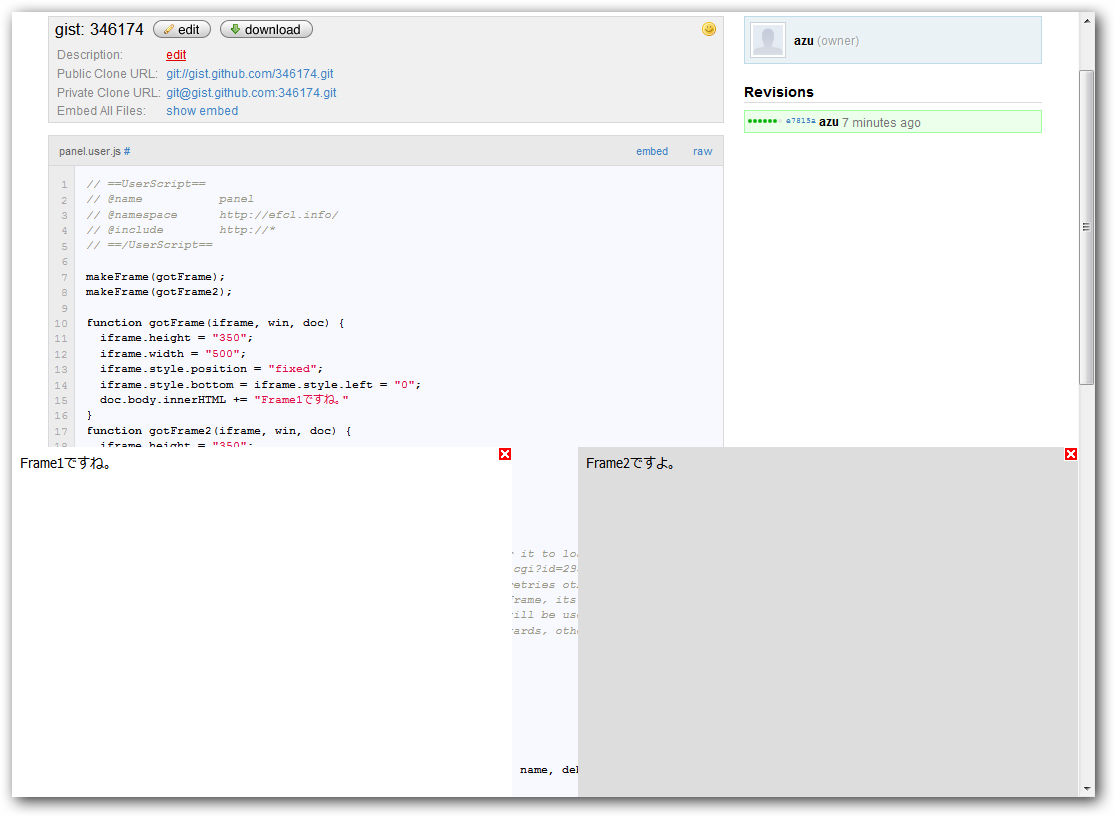
makeFrame関数は(callback ,[フレームのname , debugモード])という引数なので、gotFrame1という関数(callback)を引数にしてmakeFrameを読んでいる。 callbackには(iframe, iframeのwindow, iframeのdocument)が入ってるいるので、iframeのstyleをいじればパネルの色やサイズ、表示する場所などを指定できる。 上記のソースだと左下にframe1、右下にframe2が表示できる。
**元ネタからの改良点 **
- パネルを閉じるボタンの追加
それぞれのパネル右上に表示されているxボタンは、パネルを閉じるボタンとして機能している。 innerHTMLが+になってるのはiframe内にxボタンを追加しているため。
- Flashより上部に表示
パネルなのでFlashがあってもその上に表示できるようにした方が動作的にはいいと思うのでCSSを少し修正した。
要素をFlashより上部する方法は以前書いたFlashよりも前面にポップアップを表示するかFirefox 3.6でFlashの上に position: fixed; な要素を表示できなくなった件 – なんとなく目記を見るといい。
Firefox3.6では挙動が変わったので注意。
Flashより上に表示するには”position: fixed; overflow: auto;”とした要素であり、以下の条件を満たす必要がある。
- 透過でない(Opacityを使わない or 背景色を無指定にしない)
- CSS3?(-moz-)系のstyleを使わない。(-moz-box-shadowなどは陰の部分だけFlashより後ろに表示されてしまう
角丸border-radiusなどは要素に適応されるので要素全体がFlashより後ろに表示される。)
このmakeFrameを使ったサンプルGreasemonkeyとして
ニコニコ動画再生ページからその動画のマイリストコメントをパネル上で参照できる
Nico MylistComments for Greasemonkey : http://userscripts.org/scripts/show/72319
を作ってみた。
元ネタ(元ネタのサンプルはtypoがあるので、そのままだと動かない)
HTML Injection Tips – greasemonkey – GitHub : http://wiki.github.com/Martii/greasemonkey/html-injection-tips
お知らせ欄
JavaScript Primerの書籍版がAmazonで購入できます。
JavaScriptに関する最新情報は週一でJSer.infoを更新しています。
GitHub Sponsorsでの支援を募集しています。