

サイトの最終更新日をステータスバーに表示するアドオン「Google Date」
よくTwitterやSBMなどからURLに飛んで、それが書かれたのが結構昔だったりして誤解を生むことがあったりします。
なのでそのサイトの最終更新日を直ぐに確認できるようにした方がいいのですが、意外と日付が書いてないサイトも多いです。
そこでGoogle Dateを使うと、Googleのクロールによる更新日をステータスバーに表示することができます。
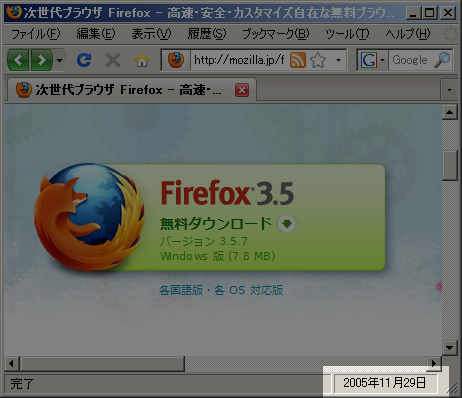
元々はGoogle検索の結果に日付を表示するアドオンだった気がしますが、いつの間にかサイト内でも更新日を表示する機能がついていました。
一応、仕組みの方が気になったのでコードを見てみると
doGetDate: function() {
    var doc = gBrowser.selectedTab.linkedBrowser.contentDocument;
    if (doc.location.href != "about:blank" && doc.location.href.match(/^http:///i)) {
        if (typeof this.reqUrl[doc.location.href] != "undefined") {
            document.getElementById("googledateStatusDate").value = this.reqUrl[doc.location.href];
        } else {
            var uri;
            if (this.reqCnt % 2 == 0) {
                uri = "http://www.google.co.jp/search?num=1&tbs=qdr%3Ay15&q=site%3A" + encodeURIComponent(doc.location.href);
            } else {
                uri = "http://www.google.com/search?num=1&tbs=qdr%3Ay15&q=site%3A" + encodeURIComponent(doc.location.href);
            }
            this.reqCnt++;
            var httpOj = new XMLHttpRequest();
            httpOj.open('GET', uri);
            httpOj.onreadystatechange = function() {
                if (httpOj.readyState == 4 && (httpOj.status == 200 || httpOj.status == 304)) {
                    var str = httpOj.responseText.match(/<span class="f std">.*?</span>/i)[0].replace(/</?[^>]+>/gi, "");
                    document.getElementById("googledateStatusDate").value = str;
                    googleDateHttpRequestObserver.reqUrl[doc.location.href] = str;
                }
            }
            httpOj.send(null);
        }
    }
}
site:https://efcl.info/2011/0218/res2272 – Google 検索みたいな感じでサイト内検索の検索結果から日付部分を正規表現で切り取ってる感じでした。
Googleにクロールされてないサイトでは日付取得ができませんが、日付の精度自体は使ってて問題ない感じになること多いのでとても便利です。
Google Date :: Add-ons for Firefox : https://addons.mozilla.org/ja/firefox/addon/google-date/
お知らせ欄
JavaScript Primerの書籍版がAmazonで購入できます。
JavaScriptに関する最新情報は週一でJSer.infoを更新しています。
GitHub Sponsorsでの支援を募集しています。